Skip to content
Workflows Resources Case Studies Pricing About
Industries · Professional Services

AI Systems That Stop Professional Firms Losing Billable Leads

Your expertise is the product. The system handles the intake calls, qualification, document chasing and follow-up that slip between your people — with outbound review rules configured by your firm.
Illustrative after-hours intake · AI receptionist
Thanks for calling Whitmore & Cole. This is the after-hours assistant. Are you calling about a new matter or an existing one?9:41 PM · illustrative sample
A new matter. I need help with a commercial lease dispute.9:41 PM
Understood. I can capture the details and book a consultation. Are you the business owner, and is the dispute currently active?9:42 PM
Yes, owner. Active — the landlord sent a notice last week.9:42 PM
Thanks. I have a 30-minute consultation on Thursday at 10:00 AM or Friday at 2:00 PM. Which suits you better?9:43 PM
Thursday works.9:43 PM
Booked for Thursday 10:00 AM. I’ve created your intake record and a conflict-check summary for the team.9:43 PM
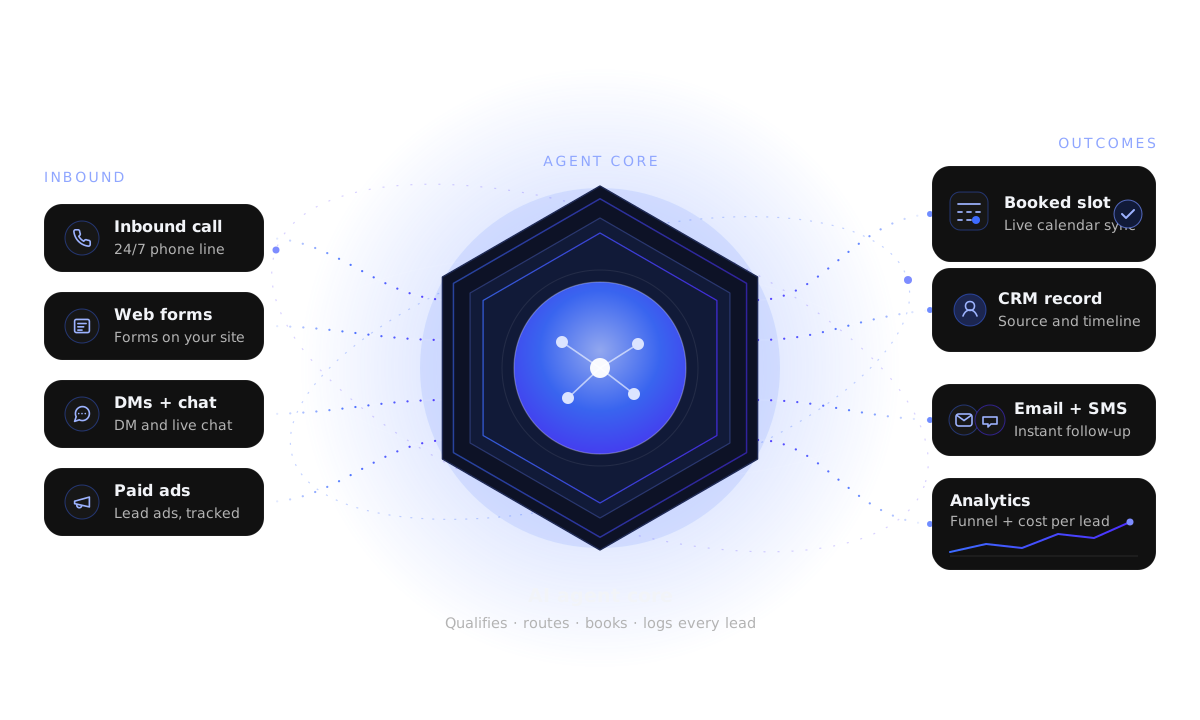
Calls, web forms, direct messages and ads flow into an AI agent, then to calendar booking, CRM, follow-up and analytics.
  1. 1
    Lead arrivesCall, form, direct message or ad
  2. 2
    AI respondsQualify using approved business information
  3. 3
    Next actionBooking, follow-up and CRM update
  4. 4
    Human handoffA person steps in when needed
Illustrative industry enquiry journey — the workflow is adapted to the business.
Where professional firms leak revenue

Good leads lost to slow, manual intake

Firms rarely lose work because the advice is wrong. They lose it because intake is slow, documents stall and follow-up is inconsistent.

Intake is a choke point

New enquiries arrive by phone, form and referral at once. Whoever answers first and follows up wins — often the smaller, faster competitor.

Documents stall the file

Engagement letters, IDs and prior records get requested again and again, turning intake into a week-long back-and-forth.

Follow-up depends on memory

Proposals and consultation no-shows are chased ‘when someone remembers’, which is exactly when they are coldest.

Intake callsConflict checksConsultationsEngagement lettersDocument chaseRetainersProposalsNo-show recoveryReferral follow-up
Where the leaks happen

Four leaks that cost professional firms work

Each leak is a place where a warm enquiry quietly goes cold.

Common leaks

  • Response-time leak — delays can give another firm the chance to start the conversation first.
  • Qualification leak — without consistent intake questions, unsuitable matters consume partner time.
  • Document leak — chasing IDs and statements by hand can delay a file and keep work waiting.
  • Follow-up leak — no-shows and dormant referrals are rarely revisited, yet they are the cheapest work to win.

Illustrative: a referral that cooled

  • MonProspect is referred by an existing client and emails the firm
  • TueThe email sits in a shared inbox while everyone is in meetings
  • WedA partner replies asking for background — no intake form, no booking link
  • FriProspect has already spoken to two other firms
  • ResultA warm referral, worked four days late
The exact AI system

Intake, qualification, scheduling and chasing — connected

Configured workflows handle enquiries on connected channels and agreed coverage hours, qualify them, offer consultation times when a compatible connected calendar has availability, and brief your people.

What the system does for a firm

  • Handles enquiries on the call, chat, form or email channels you connect, under your configured response target and coverage hours.
  • Runs a consistent intake script: matter type, parties, urgency and fit.
  • Offers consultation times only when a compatible connected calendar shows availability; reminders depend on configured delivery.
  • Collects documents through a tracked checklist and nudges until complete.
  • Drafts engagement-letter details for human review; set approval rules before anything is sent.
  • Logs captured activity to your connected CRM or practice tool with source and next action, where the integration supports it.

Illustrative path from enquiry to consultation

  • t0Enquiry captured — call, form or chat — with source tagged
  • t0AI qualifies matter type, parties, urgency and fit
  • Illustrative stepConsultation offered when a compatible calendar has availability; confirmation depends on configured delivery
  • t+2mIntake record created with a conflict-check summary
  • Day 1Document checklist sent; reminders until complete
  • Pre-callFee-earner briefed with a one-page intake summary
What the AI handles end-to-end

One system around the matters you already take

The steps below run against the rules and knowledge base your team configures.

Configured enquiry coverage

Call, chat and form handling follows the connected channels, agreed hours and routing you configure.

Exact channel coverage depends on the tools and accounts you already use.

Structured intake

Consistent questions capture matter type, parties, key dates and budget context.

Appointment scheduling

Consultation times can be offered when a compatible connected calendar shows availability; reminders and reschedules depend on configured delivery.

Document collection

Tracked checklists with polite automated nudges — IDs, statements, records.

CRM and record updates

Captured touches can be logged with source, timeline and next action when the connected tools and field mappings are configured.

Follow-up sequences

No-shows and unsent proposals can be placed in configured follow-up workflows; reply handling depends on the connected provider rules.

Proposal and retainer prep

Drafts paperwork details for approval; a human signs off before sending.

Reactivation

Dormant referrals and past enquiries re-engaged when capacity opens.

Internal knowledge assistant

Staff get answers from approved policies instead of interrupting partners.

Reporting

Enquiries by source, response time and conversion to consultation.

Illustrative follow-up sequence (hypothetical)

A consultation enquiry, followed up properly

A sample cadence — the kind that usually dies in a partner’s inbox.

Consultation enquiry — Day 0 to Day 14

  • Illustrative stepEnquiry is captured; a consultation can be offered when a compatible calendar has availability.
  • Day 0Confirmation email with intake summary and what to bring.
  • −1 dayReminder: time, fee-earner and a short document checklist.
  • No-show‘We missed you — would Friday or Monday suit better?’ with a booking link.
  • Day 3Information-only thought piece relevant to the matter; any stop behavior follows the connected provider rules.
  • Day 14Final check-in, then moves to long-term nurture.

Reply and handoff behavior follows the connected messaging provider and configured workflow; confirm channel behavior during setup.

Human in control

What stays human

Automation handles coordination. Judgement, advice and anything in your name stay with your people.

  • Any legal, tax, accounting or advisory opinion.
  • Fees, retainers, scope and engagement terms.
  • Conflict-check decisions and matter acceptance.
  • Final review of outbound client communication where your review rules require it.
  • Anything a prospect asks a person to handle.

Approval before it goes out

Agents only use your approved knowledge base — service descriptions, process steps and scheduling rules. Anything outside that scope is flagged for a human instead of guessed.

Your firm supplies approved service and scheduling information; people retain final control of fees, advice, scope and matter acceptance.

Firm visibility

Enquiry, pipeline and source visibility

See what the system did and which source actually produced engaged matters.

Admin panel

Captured enquiries are listed with source, conversation, document status and next action.

Pipeline view

New → Qualified → Consult booked → Engaged → Declined, updated automatically.

Source reporting

Which referral, campaign or directory produced the engaged matters — not just leads.

The numbers a principal actually wants

  • Response time by channel, so slow intake is visible before it costs a matter.
  • Consultation show-rate and no-show recovery rate.
  • Cost per engaged matter by source rather than cost per raw lead.

Illustrative hypothetical attribution (not client-reported), attached to the matter

  • SourceReferral / existing client / landing page A
  • LeadCommercial lease dispute — owner, active notice
  • Agent actionBooked Thursday 10:00 AM; conflict summary created
  • OutcomeEngaged after consultation → onboarding checklist sent
  • ReportingSource and outcome rolled up by channel
FAQ

Questions, answered

Is this safe for confidential client information?
Agents can use configured knowledge sources, and sensitive fields can be limited or masked. Where your workflow requires review, configure outbound client messages for human approval and confirm those rules before enabling sends.
Does the AI give legal, tax or financial advice?
No. These agents are intake and coordination only. They capture facts, qualify fit, collect documents and book consultations. Professional judgement and advice stay with your licensed people.
Will it work with our practice management software?
We build around common tools — Clio, MyCase, PracticePanther, QuickBooks, Xero, Karbon, HubSpot, Salesforce, Airtable and general CRMs. Where a native connection is not available we say so and use the best available integration.
How do retainers and engagement letters fit in?
Configure intake and document-preparation workflows for team review. Set fee and signature decisions to remain with your firm, and enable outbound documents only after the approval rules are configured.
What about conflict checks?
For firms that need them, the agent captures the full set of party names at intake and hands the matter to your conflict-check step before any engagement. It flags rather than decides.
Which firms is this not right for?
If your intake is already fully handled and you have no follow-up gap, automation will not add much. We will tell you that on the call rather than oversell.
Get your plan

Put this to work on your pipeline

Tell us how leads come in today. On the call we will review intake and follow-through and identify configured next steps.

  • A free AI strategy call — no obligation.
  • A scoped blueprint: your biggest leak and the first automation to fix it.
  • Honest fit check — if another change looks more useful than automation, we say so.

The next step is a short intake; we will map your lead journey, identify a likely bottleneck and discuss a suitable automation.

Free strategy call · No commitment · We reply by email

Ready to stop losing good matters to slow intake?

Book a free AI strategy call and we will map your intake, document chase and follow-up against this system.

Get Your AI Automation Plan