Skip to content
Workflows Resources Case Studies Pricing About
Industry

AI automation for healthcare and wellness practices

For some practices, patient enquiries compete with care delivery. Calls can go unanswered, forms can wait for a reply, and requested callbacks can be overlooked.
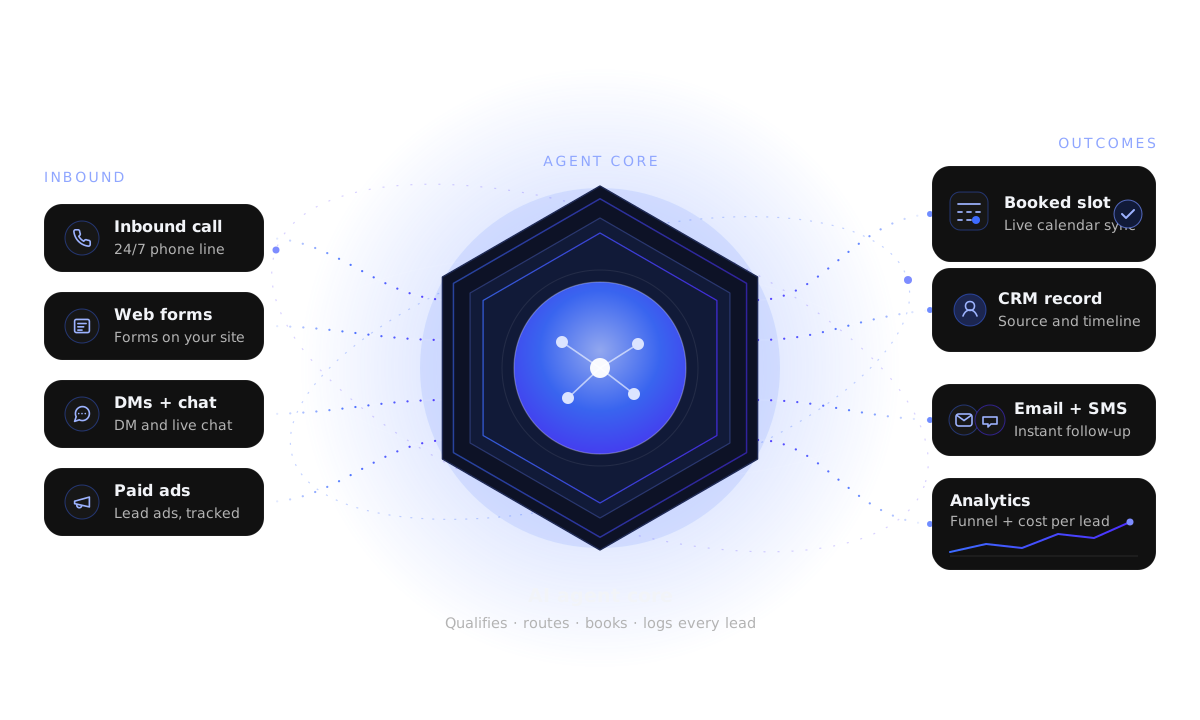
Calls, web forms, direct messages and ads flow into an AI agent, then to calendar booking, CRM, follow-up and analytics.
  1. 1
    Lead arrivesCall, form, direct message or ad
  2. 2
    AI respondsQualify using approved business information
  3. 3
    Next actionBooking, follow-up and CRM update
  4. 4
    Human handoffA person steps in when needed
Illustrative industry enquiry journey — the workflow is adapted to the business.
The context

Where clinical practices actually lose patients

Calls, forms and DMs can arrive while the team is caring for patients. Making the next step clear across connected channels can help a patient decide where to book.

Front desk, not a switchboard

Every inquiry is captured on the channel the patient used and routed with the details your team needs to act on it.

Clinical work stays clinical

The system handles logistics — booking, reminders, recalls and follow-up — and never gives treatment, diagnosis or outcome advice.

Your vocabulary, your rules

Recalls and prophylaxis, aligner checks, care plans, evals, eye exams, intakes and memberships — the AI speaks your practice and nothing else.

Compliance framing

We design HIPAA-conscious workflows: PHI handling is kept to a minimum, access is limited, and the system is built to support your compliance obligations rather than replace them. Confirm final requirements with your compliance advisor.

Leak points

Where front desks lose the most patients

None of these are marketing problems. They are response and follow-up problems — and they show up in almost every practice.

Calls that ring out at lunch

When the front desk is handling several calls, another caller may reach voicemail and wait for a callback.

Forms waiting for a reply

A patient may contact another practice while a booking request is waiting for a reply.

No reminder cadence worth the name

A reminder alone may not refill a cancelled slot; a configured process can offer openings to the waitlist.

Recalls that live in someone’s head

Hygiene, wellness-visit and annual recalls can be missed when list follow-up is inconsistent.

Practices we build for

Practice types we build for

One system, tuned to each practice’s language, intake and recall rhythm.

Dental

New-patient calls, hygiene recalls, missed-call recovery and no-show reduction for general and family dentistry.

Orthodontics

Aligner and retainer inquiries, consult booking and alignment-check recalls for orthodontic practices.

Med Spa

Consult booking, treatment-inquiry routing and past-guest reactivation for med spas.

Aesthetic Clinic

Consultation scheduling, SMS follow-up and no-show reduction for aesthetic clinics.

Chiropractic

Care-plan follow-up, adjustments scheduling, missed-call recovery and patient reactivation.

Physical Therapy

Intake, eval scheduling, visit reminders and plan-of-care follow-up for PT clinics.

Optometry

Eye-exam booking, contact-lens order capture and annual-exam recalls for optometry practices.

Medical Practice

New-patient intake, referral coordination, reminders and recall campaigns.

Wellness Clinic

Membership inquiries, program bookings, visit reminders and client reactivation.

In action

Illustrative week in the life of the system

From the first unanswered call on Monday to a recalled patient booked on Friday — an illustrative workflow continues in the background.

Illustrative example — hypothetical conversation, not a client transcript or result. Names, times, budgets and offer details are fictional placeholders; the AI uses your approved knowledge base and hands off to a human when it should.

Illustrative week (hypothetical)

  • Mon 12:14 — A call rings out during treatment. The AI voice agent picks up, takes the name, reason and best callback time, and texts the patient a booking link.
  • Mon 12:15 — A new lead lands in the CRM tagged Missed call — recovered, with the source and channel attached.
  • Tue 09:02 — An after-hours form is answered automatically; three questions qualify urgency and preferred timing, then a consult is offered.
  • Wed 16:40 — A patient asks about a treatment the AI is not approved to discuss. It routes the question to the team and books a consultation instead.
  • Thu 11:00 — Tomorrow’s appointments get a reminder text; anyone who replies to cancel is offered two alternative slots.
  • Fri 08:30 — The recall list runs: patients due for a hygiene visit or wellness check get a short, plain-language nudge.
End to end

What the AI handles end to end

Everything below is administrative. Anything clinical is handed to your licensed staff.

Configured response target

Response goals are set for the connected channels and practice hours you choose.

Configured target: response and availability goals apply once your channels and calendar are connected; this is not a service-level guarantee.

Qualification

Structured, non-clinical questions: what they are looking for, how soon, and which location suits them.

Booking

Appointments placed into your live calendar with the right duration and provider, plus confirmations.

Reminders

Configured confirmations, reminders and rescheduling options support patient follow-through.

Recalls

Hygiene recalls, alignment checks, annual exams and wellness visits run on schedule, not on memory.

Reactivation

Dormant patients from your list are re-engaged with a simple, compliant message and an easy way back in.

Follow-up

What a follow-up sequence looks like

A new inquiry that does not book straight away can enter a configured follow-up sequence. A matched inbound email reply stops the email sequence; verify other channel behavior separately.

Illustrative sequence (hypothetical)

  • Min 0 — Instant reply on the channel the patient used, with a booking link and one qualifying question.
  • Min 30 — If no response, a short SMS: “Still happy to find you a time — reply with a day that suits.”
  • Day 2 — A plain email with the practice’s hours, location and a single call to action.
  • Day 4 — A second SMS offering a specific opening, so replying is one word.
  • Day 8 — A final check-in that makes it easy to opt out or pause.
  • After booking — Confirmation, directions and a reminder cadence take over until the visit.

Why the sequence stops

Each message has a defined purpose and follows the approved contact cadence. A matched inbound email reply stops the email sequence; booking behavior follows the connected workflow.

  • Confirm channel-specific consent and opt-out handling before launch.
  • Matched inbound email replies stop the email sequence; other-channel reply handling must be verified separately.
  • If configured, the connected booking workflow can end the lead sequence and start appointment reminders.
  • No clinical advice, pricing beyond approved content, or treatment promises in any message.

Confirm consent, opt-out handling and reply-stop behavior for each connected channel before launch.

Human in control

What stays human

Automation removes busywork and keeps the judgement where it belongs.

  • All clinical decisions — assessment, diagnosis, treatment and outcomes — stay with licensed staff.
  • Final approval on any message, script or knowledge-base entry the AI is allowed to use.
  • A patient request or clinical question is routed to a human.
  • Your compliance decisions: retention, access and PHI handling on your systems.
  • Sensitive conversations — complaints, billing disputes, anything a person should own.

Illustrative handoff (hypothetical)

  • 10:02 — AI agent is booking a routine appointment
  • 10:03 — Patient asks whether a specific treatment would help their condition
  • 10:03 — Agent does not answer clinically — it offers a consultation and flags the team
  • 10:04 — Front desk sees the flag with full context and takes over
  • 10:06 — Patient booked with the right provider; conversation logged
Visibility

Admin visibility and what it changes

You should be able to see the leak, the fix and the result without asking anyone to build a spreadsheet.

Response time on every inquiry

See how fast calls, forms and messages were answered — and where they were missed.

Booking and no-show reporting

Appointments created, reminders sent, cancellations, refills and no-shows in one view.

Recall and reactivation activity

How many patients were contacted, how many replied and how many booked — by campaign.

FAQ

Questions we get from practice owners and practice managers

Is this HIPAA compliant?
We build HIPAA-conscious workflows — PHI handling kept to a minimum, limited access and audit-friendly logging — and we configure the system to support your obligations. Compliance is your responsibility with your advisor; we will not claim to make you compliant, and we will tell you plainly what the system does and does not do with patient data.
Will the AI give medical advice?
No. The agents are restricted to your approved knowledge base and to administrative topics — booking, reminders, recalls and logistics. Anything clinical is routed to licensed staff.
Does it replace our front desk?
No. It catches what the front desk physically cannot: calls during treatment, after-hours forms and messages, and the follow-up that never gets made. Your team keeps ownership of patients.
Which systems does it work with?
It works alongside your existing practice-management software and calendar rather than replacing them. We confirm the available integrations during the audit.
How fast can this go live?
A focused build usually starts with missed-call recovery and booking, then adds reminders and recalls. Timelines depend on scope and are confirmed after the audit — no fixed promises.
What does it cost?
Pricing depends on scope and the number of channels and workflows. We scope it on the free strategy call and give you a clear quote before anything is built.
Next step

Find the leak, then fix it

Tell us where inquiries are getting stuck and we will map the response, booking and recall workflows against your practice on a free strategy call.

The fastest way in: answer a few questions and we will map your lead journey, find the biggest leak and show the fastest automation win — before we ever get on a call.

Free strategy call · No commitment · We reply by email

Start with the biggest leak

Most practices start with missed-call recovery and after-hours form response, then add reminders and recalls once the first workflow is stable.

Ready to see it mapped to your practice?

Book a free AI strategy call and we will walk the full journey — response, booking, reminders, recalls and reactivation — against your patient flow.

Get Your AI Automation Plan