Skip to content
Workflows Resources Case Studies Pricing About

Home / Services / AI Receptionist

AI Agent

AI reception for your connected phone lines

For calls reaching a connected line, the receptionist can answer common questions, route or book the caller, and create an owner task with call context according to configured coverage and escalation rules.

Connected-line intake Books or routes SMS follow-up task

Illustrative example — Saturday, 7:42 pm

  • 7:42 pm A call comes in long after the office has closed.
  • 7:42 pm The receptionist answers and greets the caller by business name.
  • 7:43 pm Caller describes a burst pipe and gives the address.
  • 7:44 pm Confirms it is urgent, takes the details, and books the first Monday slot.
  • 7:44 pm Owner gets the caller summary and a task to send confirmation; automated SMS requires a connected provider.
  • Mon 9:00 am The team arrives with the details already in the CRM.
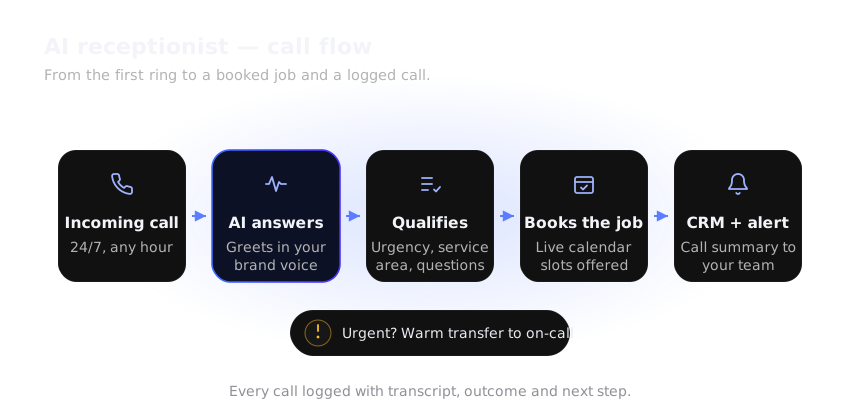
AI receptionist call flow: a call reaching a connected line is qualified, booked or routed, and recorded with an owner task for follow-up.
  1. 1
    Call receivedCapture caller intent
  2. 2
    Answer and qualifyUse approved business details
  3. 3
    Book or routeOffer a slot or human handoff
  4. 4
    Record the callSave the summary and next action
Illustrative call flow — your receptionist is configured around your call rules.
The problem it solves

Voicemail is where good jobs go to die

A caller who reaches an answering machine rarely leaves a message — they dial the next business on the list. The calls you miss are not messages waiting for you. They are customers who have already moved on.

  • Your busiest hours are exactly the ones when nobody can pick up the phone.
  • The same five questions — hours, service area, availability, pricing, parking — eat the whole day.
  • After-hours calls are missed, or answered badly by whoever happens to notice them.
  • Front-desk time goes to the phone instead of the customers standing in front of you.
  • Lunch breaks and staff holidays leave the line uncovered at the worst moments.

The front desk you wish you had

  • Handles calls that reach a connected line, within configured coverage and available telephony capacity.
  • Handles the routine questions without pulling anyone off a job.
  • Books the appointment or routes the call, then tells your team.
  • Uses a steady, configured tone, with human handoff available under your routing rules.

It is not a phone tree with press-one menus. It is a conversation, grounded in the answers you approve.

What it handles

Front-desk tasks across configured connected channels

Capabilities are set up around how your business actually answers the phone.

Connected-line answering

Handles calls received on connected lines according to your configured coverage and routing rules.

FAQ answers

Answers your most common questions from an approved knowledge base, in a natural tone.

Call routing

Warm-transfers the caller to the right person or department when the call needs a human.

Appointment booking

Checks real availability and books the caller straight into your calendar while on the call.

Messages & owner tasks

Captures a message and creates an owner task for the team to review and follow up.

Missed-call follow-up task

SMS sequence steps create an owner task; automated text-back requires a connected SMS provider.

Bilingual handling

Greets and handles callers in the languages you need, then hands off to a fluent human.

Spam filtering

Screens obvious robocalls and spam so your team is not chasing junk.

Human handoff

Steps back when a caller asks for a person or the topic goes beyond your configured escalation rules.

Human in control

What stays human

The receptionist is configured for routine calls, not business decisions. Set escalation rules to route decisions outside that scope to a person.

  • Anything commercial — quotes, discounts, contract terms.
  • Complaints and upset callers.
  • Policy exceptions and special requests.
  • Emergencies that genuinely need a human on the line.
  • The knowledge base itself: what the receptionist is allowed to say.

If a request is outside the configured approved sources, escalation rules can route it to a person or create a follow-up task. Confirm the handoff for your connected lines.

Illustrative example — when it hands over

  • 2:10 pm Caller asks for a warranty exception.
  • 2:10 pm The receptionist does not decide — it asks for a number and a good time.
  • 2:11 pm Flags the on-call manager with the caller’s summary.
  • 2:35 pm The manager calls back with the full story already in hand.
How a call runs

Connected calls follow a configured five-step flow

Consistency is the point — the tenth call sounds as good as the first.

1

Greet

Answers with your business name and a friendly tone.

2

Understand

Works out who is calling and what they need.

3

Answer or route

Handles FAQs or sends the call to the right person.

4

Book or take a message

Secures a slot, or captures the details cleanly.

5

Record & assign

Logs the call and creates an owner task for team follow-up.

After-hours emergency

Illustrative example

A caller reports a leak at 11 pm. For calls that reach a connected line, the receptionist can capture the details, offer an available slot, and create an owner task for on-call review.

Lunchtime overflow

Illustrative example

Two lines ring while the desk is with a customer. The second caller is greeted, booked, and confirmed — without anyone leaving the counter.

Existing customer rescheduling

Illustrative example

A regular calls to move an appointment. The receptionist finds the record, offers new times, and updates the calendar and CRM in one go.

Where it sits

How it fits the full system

The AI Receptionist handles calls that reach connected lines according to your coverage and routing setup, then records the details for your team.

1

Traffic

Ads, search and social.

2

Capture

Calls that reach a connected line, within configured coverage and available telephony capacity.

3

AI Response

Greeted and handled live.

4

Qualification

Basic screening on the call.

5

CRM

Call and caller logged.

6

Follow-Up

Creates an owner task if a call slips; automated SMS requires a connected provider.

7

Appointment

Booked during the call.

8

Sales

Your team takes it from there.

9

Analytics

Call volume and outcomes.

Where it works best

  • Plumbing — urgent calls that cannot wait until morning.
  • Veterinary — after-hours calls handled while the clinic is closed.
  • Law Firms — intake calls screened and routed without a receptionist.
Integrations

Answers on your line, logs to your CRM

The receptionist works with the phone and calendar tools you already have. Common connections include Twilio for telephony, GoHighLevel and HubSpot for the CRM, Google Calendar and Calendly for booking, and WhatsApp for message-based follow-up — by native integration where one exists, and via API or webhook where it does not.

Because call handling depends on your provider and number, we confirm what is possible before you commit. Where a direct connection is missing, an automation layer such as n8n, Make or Zapier often bridges the gap.

Twilio GoHighLevel HubSpot Google Calendar Calendly WhatsApp n8n / Make / Zapier
FAQ

AI receptionist questions

Does the AI receptionist work after hours and on weekends?
After-hours handling depends on connected channels and configured coverage. When enabled, the agent can take details and book or route the caller according to your rules.
Can it answer on our same business number?
Usually yes. It connects to your existing line or a new number through your telephony provider, so callers keep dialing the number they already know.
Can a caller still reach a human?
Yes. If the caller asks for a person, the issue is urgent, or your rules say so, the receptionist transfers or flags a human instead of handling it alone.
Which languages can it greet callers in?
It can greet and handle calls in the languages you need, then hand off to a fluent human when a conversation goes beyond the approved setup.
What will the receptionist not answer?
If a request is outside the configured approved sources, escalation rules can route it to a person or create a follow-up task. Confirm the handoff for your connected lines.
How long does it take to set up?
It depends on scope and call volume. After the audit we agree a staged rollout and realistic dates rather than fixed promises. Questions? Email [email protected].
Get started

See your AI receptionist mapped to your call flow

Share a few details and we will show where calls go unanswered today — and what the receptionist would handle first.

The fastest way in: answer six short questions and we will map your lead journey, find the biggest leak and show the fastest automation win — before we ever get on a call.

Free strategy call · No commitment · Contact us by email

Ready for a clearer connected-call intake process?

Book a free AI strategy call and we will map the AI Receptionist against your real call volume and opening hours.

Get Your AI Automation Plan