Skip to content
Workflows Resources Case Studies Pricing About
Industry

AI automation for real estate

Real estate is a speed-to-lead business. A timely response can keep a conversation moving, while delays create a risk that the lead will move on.
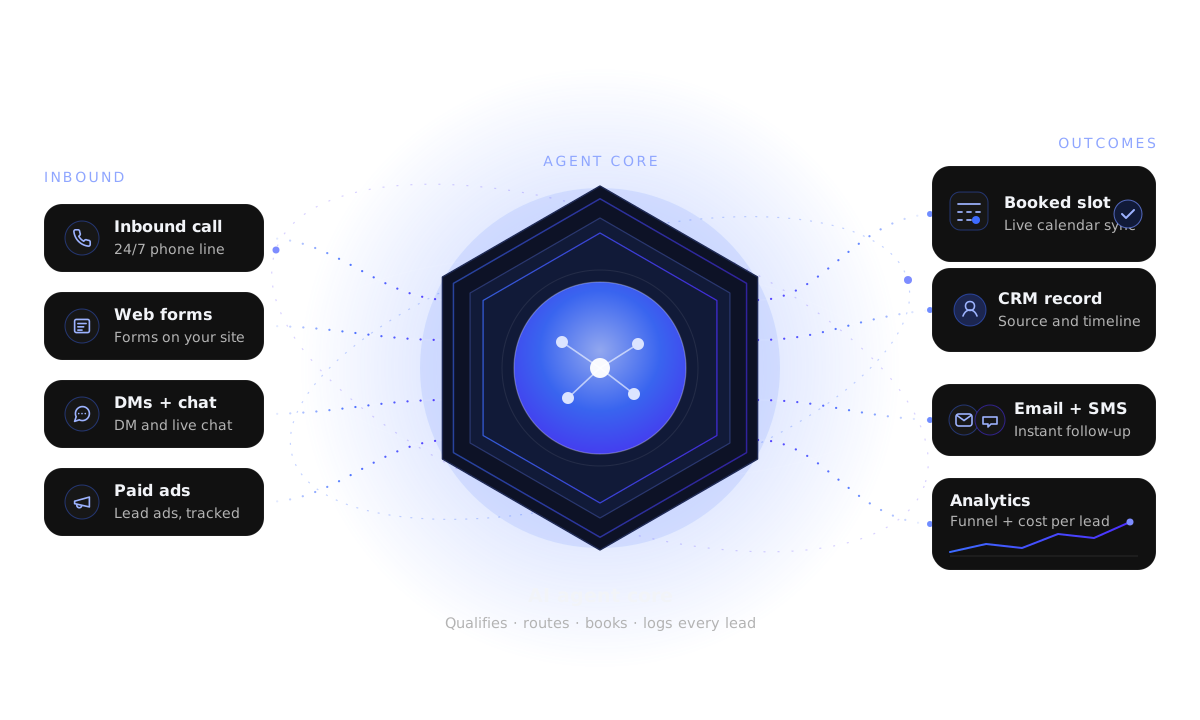
Calls, web forms, direct messages and ads flow into an AI agent, then to calendar booking, CRM, follow-up and analytics.
  1. 1
    Lead arrivesCall, form, direct message or ad
  2. 2
    AI respondsQualify using connected approved sources
  3. 3
    Next actionBooking, follow-up and CRM update
  4. 4
    Human handoffA person steps in when needed
Illustrative industry enquiry journey — the workflow is adapted to the business.
The context

What every real estate pipeline has in common

Leads arrive from portals, ads, referrals and signs. They are mixed in quality, impatient, and rarely qualified before an agent spends time on them.

Response timing shapes the experience

Clear coverage and timely follow-up help leads know what to expect.

Qualification is information-gathering

Budget, timeline and area interest — generic questions, never demographic targeting.

Follow-up wins the long game

Most leads are not ready today. Nurture is where the deals actually come from.

Fair-housing note

Qualification questions are deliberately generic — budget, timeline and area of interest. Nothing in the workflow targets, steers or excludes based on protected characteristics, and your team sets the questions it is comfortable with.

Leak points

Where real estate leads are lost

Four leaks show up across solo agents, teams, property managers and commercial brokers alike.

Slow first response

A portal lead sits until someone opens the inbox, and by then it is a conversation with someone else.

No qualification before the call

Agents spend time on leads who were never in a position to transact.

Showings that never get scheduled

A lead ready to view never receives a concrete time.

Follow-up that stops before the lead is ready

The leads that needed a month of nurture are written off in a week.

Practices we build for

Who we build for in real estate

The same foundation, tuned to how each part of the business actually works.

Real Estate Agents

A solo pipeline for configured lead response, qualification and showing coordination while you are with clients.

Real Estate Teams

An ISA layer for configured response, lead routing and scoring, plus nurture for the team.

Property Management

Maintenance-request intake, tenant screening handoff, owner inquiries and turnover follow-up.

Commercial Real Estate

Buyer and tenant qualification, LOI stage tracking and listing follow-up for commercial brokers.

Investment Services

Motivated-seller intake, deal-flow qualification and disposition follow-up for investment firms.

In action

A lead, handled from first touch to showing

The whole path is administrative: respond, qualify with generic questions, schedule, follow up.

Illustrative example — the conversation is a hypothetical, not a client transcript. The AI responds only from the approved sources you connect, and routes anything outside that boundary — or any request for a person — to your team for review.

Illustrative lead path (hypothetical)

  • Illustrative step A portal lead arrives through a connected source; response timing follows configured targets and coverage.
  • 14:03 — The lead answers; the record is tagged Buyer — pre-approved, 60 days and routed to the right person.
  • 14:06 — Two showing times are offered for a specific property the lead asked about.
  • 14:07 — The lead books Saturday 11:00; confirmation and directions go out.
  • Day 2 — No reply from a second lead; a nurture sequence begins with relevant listings.
  • Day 21 — The second lead replies and is reintroduced to an agent with full context.
End to end

What the AI handles end to end

Everything before the agent conversation, and everything after the lead goes quiet.

Configured response target

Response goals are set for connected channels and the coverage hours and routing you choose.

Configured target: response and availability goals apply once your channels and calendar are connected; this is not a service-level guarantee.

Qualification

Generic information-gathering: budget, timeline, financing stage, area of interest.

Showing coordination

Viewing times can be offered when a compatible connected calendar reports availability; confirmations depend on your configured delivery channels.

Lead scoring and routing

Leads scored and routed to the right agent or team member.

Nurture

Long-run SMS and email sequences with property-interest tracking.

Reactivation

Cold and dormant leads re-engaged from your database.

Follow-up

What a follow-up sequence looks like

A configured nurture cadence can run over connected channels; reply and opt-out handling depends on the messaging provider and workflow settings.

Illustrative buyer nurture (hypothetical)

  • Min 0 — Configured reply with two qualifying questions and a link to relevant listings.
  • Min 30 — If no reply, a short SMS: “Want me to send a few matches in your area?”
  • Day 2 — An email with a small selection matching stated budget and area.
  • Day 6 — A check-in offering a call with an agent.
  • Day 14 — A final nudge before pausing the sequence.
  • On reply — Handling follows the connected provider and workflow rules configured by your team.

Why the sequence stops

Nurture workflows should be configured around your approved reply and opt-out handling rules before live delivery.

  • SMS requires separately collected consent and an approved, connected messaging provider; opt-out handling depends on the configured provider workflow.
  • Reply handling depends on the connected provider and workflow rules; an owner task or alert can be configured.
  • Qualification stays generic — budget, timeline, area — never demographic.
  • Works alongside your connected CRM rather than replacing it.

Opt-out and reply handling depend on the connected provider and workflow configuration; verify these controls before enabling live sends.

Human in control

What stays with your agents

The system handles response and follow-up. Judgement, advice and negotiation stay human.

  • Pricing advice, valuations and market opinions.
  • Negotiation, offers, counteroffers and contract decisions.
  • Any representation or commitment on behalf of a client.
  • Escalation to a human the moment a lead asks for one.
  • Your qualification questions and what the AI is allowed to say.

Illustrative handoff (hypothetical)

  • 16:20 — Agent is qualifying a new lead
  • 16:21 — Lead asks what the property is worth and whether to offer over asking
  • 16:21 — Agent does not advise — books a call and flags the human agent
  • 16:22 — Human agent takes over with full context
  • 16:25 — Call scheduled; question logged
Visibility

Admin visibility and what it changes

See speed, source and conversion without asking anyone to build a report.

Response time by source

Where leads are answered fast and where they are missed.

Lead scoring and routing quality

Which sources produce qualified leads and how they are distributed.

Showing and nurture activity

Track showing bookings, configured sequences and reactivation where connected systems support the reporting.

FAQ

Questions we get from agents and team leads

Do we have to change our CRM?
No. We connect to supported CRMs where configured — the system feeds your connected CRM and follows its stages rather than replacing it.
How does qualification stay compliant?
Questions are generic and business-relevant: budget, timeline, financing stage and area interest. The workflow never targets or excludes based on protected characteristics.
Will it respond to portal leads?
Yes — where each channel is connected, portal leads, Facebook Lead Ads, website forms, calls and DMs feed the same configured-response workflow, with anything outside that coverage routed to your team.
Does the AI negotiate or give advice?
No. Anything involving pricing advice, offers or representation is escalated to a human agent under your routing rules.
What about SMS compliance?
Consent is collected separately, every message has an opt-out, and opt-outs are honoured immediately.
Where do we start?
Usually with configured response and showing scheduling, then scoring, routing and nurture.
Next step

Find the leak in your pipeline

Tell us where leads are going cold and we will map configured response, qualification, showings and nurture on a free strategy call.

The next step is a short intake; we will map your lead journey, identify a likely bottleneck and discuss a suitable automation.

Free strategy call · No commitment · We reply by email

Start with the biggest leak

Real estate businesses can start with configured lead response and showing coordination, then add scoring, routing and nurture.

Ready to build a consistent response workflow?

Book a free AI strategy call and we will walk lead response, qualification, showings and nurture against your pipeline.

Get Your AI Automation Plan